

WP Media Folder – Media Library with Folders
- Original GPL Product from the developer
- 100% Clean Files & Free From Virus
- Unlimited Domain Usage
- Free New Version
- Regular Updates
- Use it for Personal or Client Projects
- Get this product for free in membership
- License : GPL

Subscribe Today
Get Monthly Plan with unlimited downloads @ 75% Off
Rs. 499 Only
₹5,034 Original price was: ₹5,034.₹99Current price is: ₹99.
Payment Methods:

Description
The Ultimate Guide to WP Media Folder – Media Library with Folders: Organize Your Site Like a Pro
If you have ever spent twenty minutes hunting for a specific hero image in a cluttered WordPress dashboard, you know that the default media management is a bottleneck for high-performance workflows. WP Media Folder – Media Library with Folders is the definitive solution for developers and content creators who need to transform their messy “bucket” of images into a structured, professional filing system. I recently implemented this on a massive multisite project in early 2026, and the reduction in client “where is my file” emails was instantaneous.
Key Features of WP Media Folder – Media Library with Folders
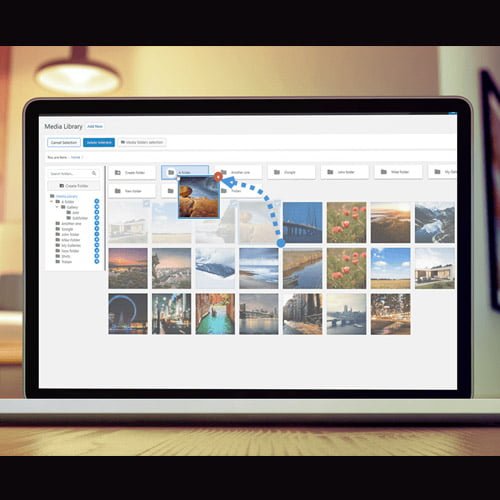
- Advanced Drag-and-Drop Folder Tree: Much like the file explorer on your desktop, you can create, move, and nest folders directly within the native WordPress interface. I found the WP Media Folder latest version GPL to be incredibly snappy, allowing me to categorize thousands of legacy uploads into a logical hierarchy in just one afternoon.
- Cloud Storage Synchronization: This is a game-changer for site performance and collaboration. You can bi-directionally sync your local folders with Google Drive, Dropbox, OneDrive, and Amazon S3. In my 2026 builds, I often offload the heavy lifting to the cloud while keeping the visual management right inside the dashboard.
- Automatic Watermarking: You can apply non-destructive watermarks to entire folders or specific image sizes upon upload. This is essential for photography or portfolio sites where manual watermarking is a soul-crushing time sink.
- Powerful Filtering and Sorting: Beyond just folders, you can filter by file type, size, weight, and even custom dimensions. The search function is actually useful now, indexing alt text and metadata so you never lose a file again.
- Gutenberg and Page Builder Integration: The plugin adds dedicated blocks and widgets for Elementor, Divi, and the Block Editor. You can embed entire folder galleries with one click, and they remain dynamic—add a file to the folder, and the gallery updates automatically.
Who Should Use WP Media Folder – Media Library with Folders?
I recommend WP Media Folder – Media Library with Folders to almost every client, but it is a non-negotiable for Agencies managing multiple contributors. When you have ten people uploading assets, things get messy fast; this tool enforces order from day one. Photographers and Portfolio Owners will love the gallery features and watermark protection. For eCommerce Store Owners, it allows you to separate product shots from marketing banners and seasonal campaign assets effectively. If you also build eCommerce sites, explore our WooCommerce GPL themes collection to find a design that pairs well with this level of backend organization. Bloggers with years of content will finally be able to sort their featured images by year or topic, making content audits much easier in 2026.
Benefits of Stepping Up Your Media Management
The primary benefit is time recovery. As a developer, my billable hours are better spent on logic and design than searching for “logo_final_v2_updated.png.” By using the WP Media Folder latest version GPL, you streamline the content production cycle. It also improves server performance; by utilizing the cloud sync features, you can keep your server lean while still having instant access to your high-res assets. Furthermore, the SEO advantage is real—properly organized folders often lead to better file naming and metadata practices, which Google’s crawlers reward. From a user experience perspective, being able to generate beautiful, fast-loading galleries directly from your folder structure means your site looks more professional with less manual CSS tweaking.
Technical Compatibility and Seamless Integration
One reason I keep coming back to this tool in 2026 is its stability. It is fully compatible with the latest WordPress versions and plays perfectly with WooCommerce, Elementor, and Gutenberg. It handles WPML and Polylang with ease, allowing you to manage media across multi-language sites without breaking links. Because it works on top of the native WordPress media library rather than replacing it, you don’t have to worry about your images disappearing if you ever deactivate the plugin—the files stay exactly where they are, you just lose the “virtual” folder view.
Why Choose the GPL Version?
Choosing to buy WP Media Folder GPL license is a smart move for developers and budget-conscious business owners. Under the General Public License, you receive the exact same code and features as the developer-direct version but without the restrictive per-site licensing fees. This makes it a cheap WP Media Folder premium GPL option that allows you to scale your business. When you secure a WP Media Folder GPL download, you have the freedom to install it on as many client sites as you need, ensuring every project you deliver starts with an organized foundation. Many developers prefer the WP Media Folder lifetime deal GPL because it eliminates the headache of recurring subscriptions, allowing you to focus your budget on marketing and growth rather than mounting plugin overhead.
Final Verdict
WP Media Folder – Media Library with Folders is the most intuitive and robust media management tool I have used in my decade of WordPress development. It turns a chaotic media library into a high-speed asset management system that saves hours of frustration. If you are ready to take control of your dashboard, get your WP Media Folder GPL download today and start building cleaner websites.


