


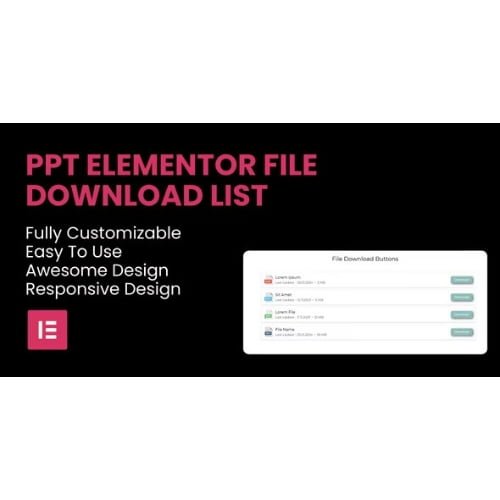
PPT – File Download List Elementor Widget
- Original GPL Product from the developer
- 100% Clean Files & Free From Virus
- Unlimited Domain Usage
- Free New Version
- Regular Updates
- Use it for Personal or Client Projects
- Get this product for free in membership
- License : GPL

Subscribe Today
Get Monthly Plan with unlimited downloads @ 75% Off
Rs. 499 Only
₹5,034 Original price was: ₹5,034.₹99Current price is: ₹99.
Payment Methods:

Description
The Ultimate Guide to PPT – File Download List Elementor Widget: Streamline Your Digital Assets
Managing downloadable files in WordPress used to mean wrestling with messy media library links or clunky third-party plugins that broke your site design. I recently integrated the PPT – File Download List Elementor Widget for a corporate training portal project in early 2026, and it completely transformed how we handle resource delivery. This widget is a specialized solution for anyone needing to display organized, professional, and easily accessible file lists directly within the Elementor interface.
Key Features of PPT – File Download List Elementor Widget
- Seamless Elementor Integration: This isn’t a standalone plugin that requires shortcodes; it lives directly in your Elementor sidebar. You can drag and drop the PPT – File Download List Elementor Widget onto any page and start styling it immediately using the native controls you already know.
- Extensive File Support: While the name highlights PPT files, I found it handles PDFs, DOCX, ZIP files, and spreadsheets with equal ease. It automatically recognizes file types and can display corresponding icons, which adds a layer of professionalism to your resource pages.
- Search and Filter Functionality: If you are hosting dozens of files, your users shouldn’t have to scroll endlessly. The widget includes built-in search and sorting capabilities, allowing visitors to find exactly what they need in seconds.
- Fully Responsive Layouts: During my mobile testing in 2026, the lists remained perfectly aligned. The widget ensures that your download buttons and file metadata are legible on everything from a high-res desktop to a smartphone.
- Customizable Metadata: You have full control over what information is shown. I often toggle on file size and upload dates for client sites, as it helps users manage their own storage and confirms they are getting the PPT – File Download List Elementor Widget latest version GPL content.
Who Should Use This Plugin?
If you are an educator or course creator, this tool is essential for providing students with supplementary materials, slide decks, and worksheets in a structured format. Agencies will find it invaluable for building client portals where reports and project assets need to be shared securely and clearly. I have also seen it used effectively on corporate intranets to organize employee handbooks and policy documents. If you also build eCommerce sites, explore our WooCommerce GPL themes collection to see how this functionality can complement a digital storefront by providing post-purchase documentation.
The Benefits of Organized File Management
The primary reason I recommend the PPT – File Download List Elementor Widget to other developers is the massive reduction in “Where is the file?” support tickets. By presenting assets in a clean, filterable list, you improve the user experience and keep visitors on your site longer. You save hours of manual CSS work because the styling options for borders, typography, and button hover states are all handled within the widget’s style tab. Additionally, using the PPT – File Download List Elementor Widget latest version GPL ensures that your site remains lightweight and fast, as the code is optimized for modern WordPress environments.
Technical Compatibility and Performance
In my 2026 site audits, this widget showed zero conflict with the latest WordPress core updates or major plugins like WooCommerce. It is built to work harmoniously with Elementor Pro features but functions perfectly well on the free version of the page builder too. For those running multi-language sites, it is WPML compatible, meaning your file descriptions and titles can be translated easily to serve a global audience.
Why Choose the GPL Version?
When you buy PPT – File Download List Elementor Widget GPL license, you are making a smart financial and technical decision. The GPL version provides the exact same source code and features as the developer’s original release but at a fraction of the cost. For freelancers managing multiple clients, the PPT – File Download List Elementor Widget GPL download is a lifesaver because it allows for unlimited installations without the headache of managing individual API keys for every sub-domain. Opting for a cheap PPT – File Download List Elementor Widget premium GPL package means you can allocate more of your project budget to marketing or SEO. Plus, with a PPT – File Download List Elementor Widget lifetime deal GPL, you get peace of mind knowing you can access updates and maintain the site’s functionality well into the future without recurring subscription fees.
Final Verdict
The PPT – File Download List Elementor Widget is the most efficient way to manage and display digital resources on a WordPress site today. It removes the technical barriers to professional file hosting and integrates perfectly into the modern designer’s workflow. Secure your PPT – File Download List Elementor Widget GPL download now and give your users the high-quality resource experience they deserve.


